NewAI helpers that summarize, answer, draft and watch your server →
One bot instead of eight

The only bot your Discord server actually needs

Moderation, anti-raid, welcome cards, levels, tickets, an economy, alerts, real insights into your community, and now AI helpers. All in one bot, run from one dashboard your whole team can sign in to.

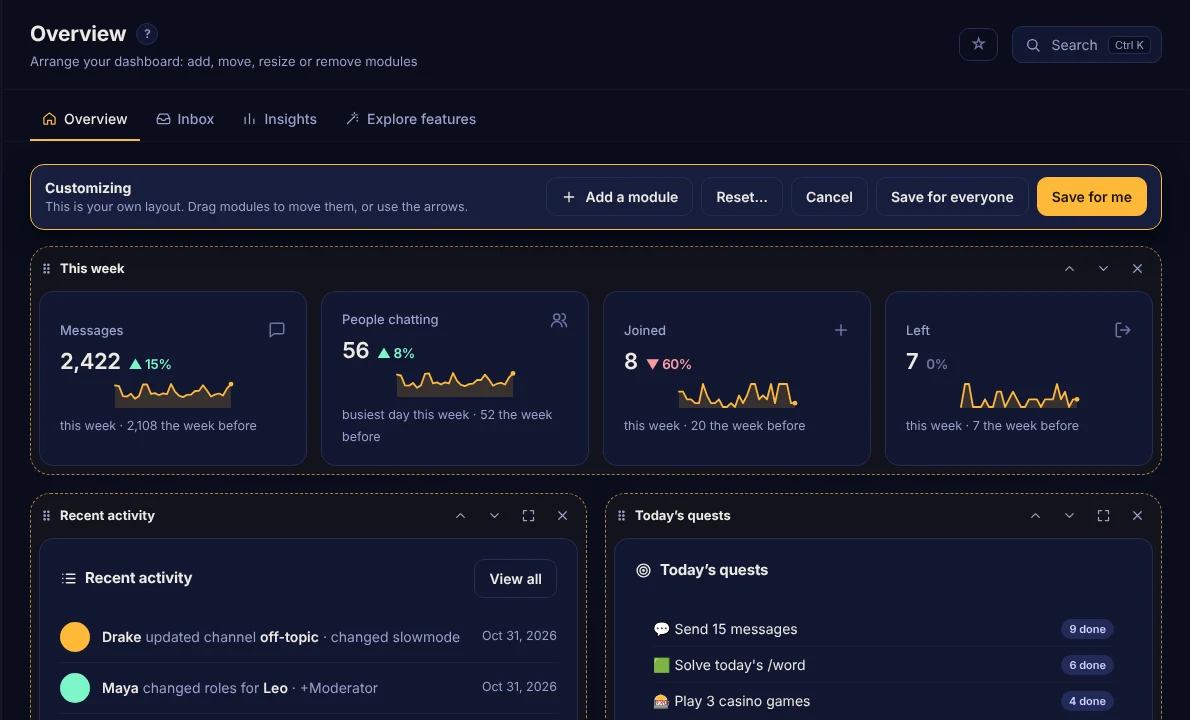
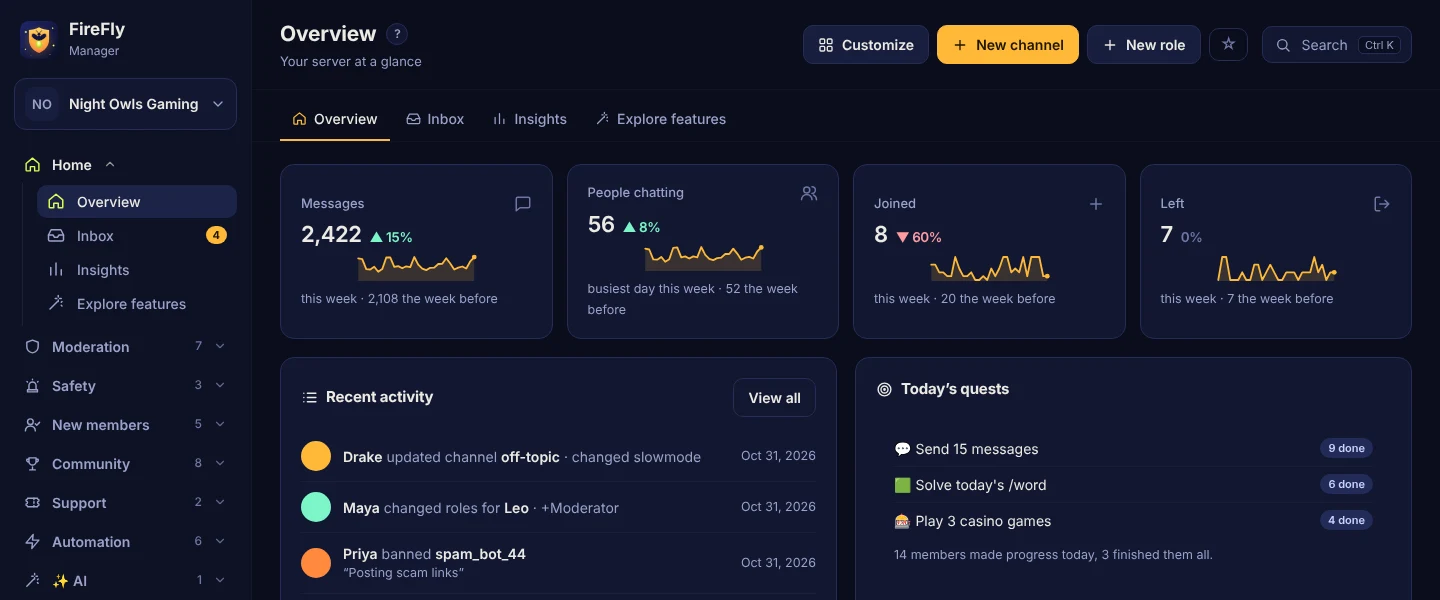
The FireFly dashboard Overview, arranged with this week's numbers, recent activity, today's quests and more
✨ New · AI helpers

Your server just got a brain

Just @mention FireFly and chat with it, with a personality you pick. Catch up on 200 messages in one command. Answer the same question for the hundredth time without lifting a finger. Answer questions from your server info and the web, with sources. Draft ticket replies, and spot the nasty stuff word filters miss. Powered by Claude or OpenAI, with your own key.

# general
🌐 Knows your server and the webAnswers from your rules and info first, and searches the web (with links) when they don’t cover it.
🔑 Your key, your billUse your own Claude or OpenAI account. FireFly encrypts the key and never shows it again.
🛡️ Mods stay in chargeFlagging alerts your team with Delete, Time out and Looks fine buttons. Nothing is auto-punished unless you say so.
📉 No surprise costsSet a daily request limit per server and see exactly what each helper uses.
Tidy up your member list

Stop juggling a bot for every job

Most servers run a moderation bot, a leveling bot, a ticket bot, an alerts bot and a handful more. FireFly does all of it, with one set of permissions and one place to change settings.

Moderation & logsAnti-raid & anti-spamWelcome imagesLevels & rank cardsEconomy & shopTicketsStaff applicationsReaction rolesGiveaways & pollsSuggestionsStarboardCountingYouTube & Twitch alertsBirthdaysRemindersTemp voice channelsCustom commandsAnnouncement embedsBan appealsServer stats channelsServer backupsModMailAnti-nukeScam-link removalCaptcha verificationEvent RSVPsMini-gamesDaily quests & badgesGitHub & GitLab feedStandups & on-call✨ AI summaries✨ AI moderation✨ AI answers
Features

Everything a growing server needs

Protection

Anti-raid, anti-spam you can try on last week's chat before switching it on, scam-link removal, quiet channels for busy game rooms, a permission checkup, a verification gate with captcha, rogue-staff protection that stops a hacked mod mid-spree, an Undo button for deleted channels and roles, and a cleanup advisor that finds dead channels, unused roles and forgotten emojis, and searchable logs you can filter by person, event, channel and date.

Moderation

Numbered cases for every warning, timeout, kick and ban (even ones done in Discord) with evidence attached, saved reasons, one-click warn and delete, automatic punishments, temporary bans and roles, a detailed mod log, private notes, ban appeals, and /mydata so members can see, download or delete their own data.

Welcome

Picture cards with each new member's avatar, auto-roles, welcome DMs, goodbye messages, and roles given back when someone rejoins.

Levels & economy

XP for chatting (and for time in voice with Premium), level-up rewards, double-XP events and monthly seasons, /rank cards and a shareable leaderboard page, plus coins, a role shop, /pay and a casino: slots, blackjack, roulette and higher-or-lower, plus member-vs-member /duel, /rps and a /pot jackpot. Switching? Import levels from MEE6.

Tickets, applications & suggestions

A button that opens a private help channel with saved transcripts, staff application forms that pop up inside Discord (accepting gives the role), and a suggestions box with one-vote-per-person buttons.

Alerts

Post when a YouTube channel uploads, a Twitch or Kick streamer goes live, someone posts on Bluesky, or any website or subreddit has something new.

Fun & community

Daily quests and badges that give members a reason to come back, custom roles members make themselves (with a name filter that keeps them clean), events with RSVP, /trivia and a daily word game, giveaways, polls, a starboard, counting, birthdays, /watch together, Spotify /np and server music charts.

For developer teams

A GitHub and GitLab feed with failed-CI alerts, link previews for issues and code, issues from Discord, a daily standup, an on-call rota and incident channels. Plus a Developer team server template.

Automation

No-code automations ("when someone reaches level 10, give a role and post"), custom slash commands, auto-replies, reaction roles, sticky messages, scheduled posts that go out when people are around, stats channels, and copy your whole setup from another server with a preview first.

Only on FireFly

Know your community, not just your member count

FireFly's Insights show what other bots don't.

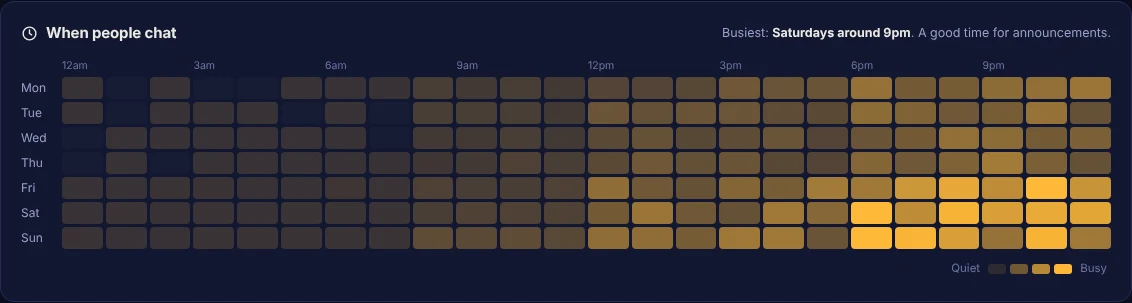
  • When people actually chat: an hour-by-hour heatmap shows the best time to post announcements.
  • Do new members stick around? See how many joined, stayed and said something.
  • Who needs a hello: newcomers who haven't spoken yet, so someone can welcome them.
  • A weekly report posted every Monday with the numbers that matter.
A heatmap of messages by day and hour, showing Saturday evenings are busiest
Only on FireFly

See every permission at once

Discord shows one role or one channel at a time. FireFly maps the whole server and tells you what's wrong.

  • A permission checkup finds staff channels anyone can read, roles that let hundreds of people ping @everyone, and overrides that fight each other. Most come with a one-click fix.
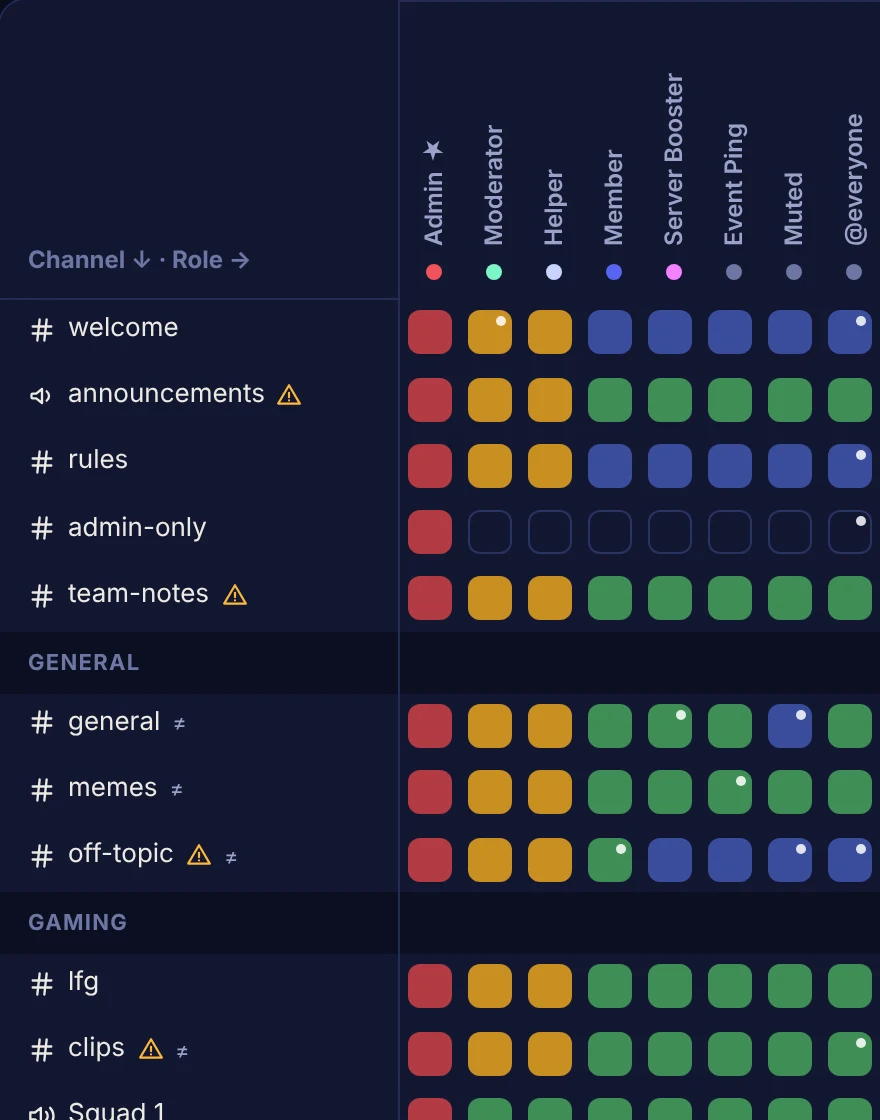
  • The map: every channel against every role in one grid. Click any square and FireFly explains Discord's reasoning step by step.
  • Who can see this channel? What can this person see? Answered in a click, with the reason in plain English.
  • What if: before giving someone a role, see every channel they'd gain or lose.
  • Access changes in the mod log: "@Member can now see #mod-logs" the moment it happens.
A grid of channels against roles, coloured by whether each role can see, post in or manage each channel
Only on FireFly

A whole server in one click

Starting fresh? Pick a template and FireFly builds it: roles, categories, channels and permissions, with the right features switched on.

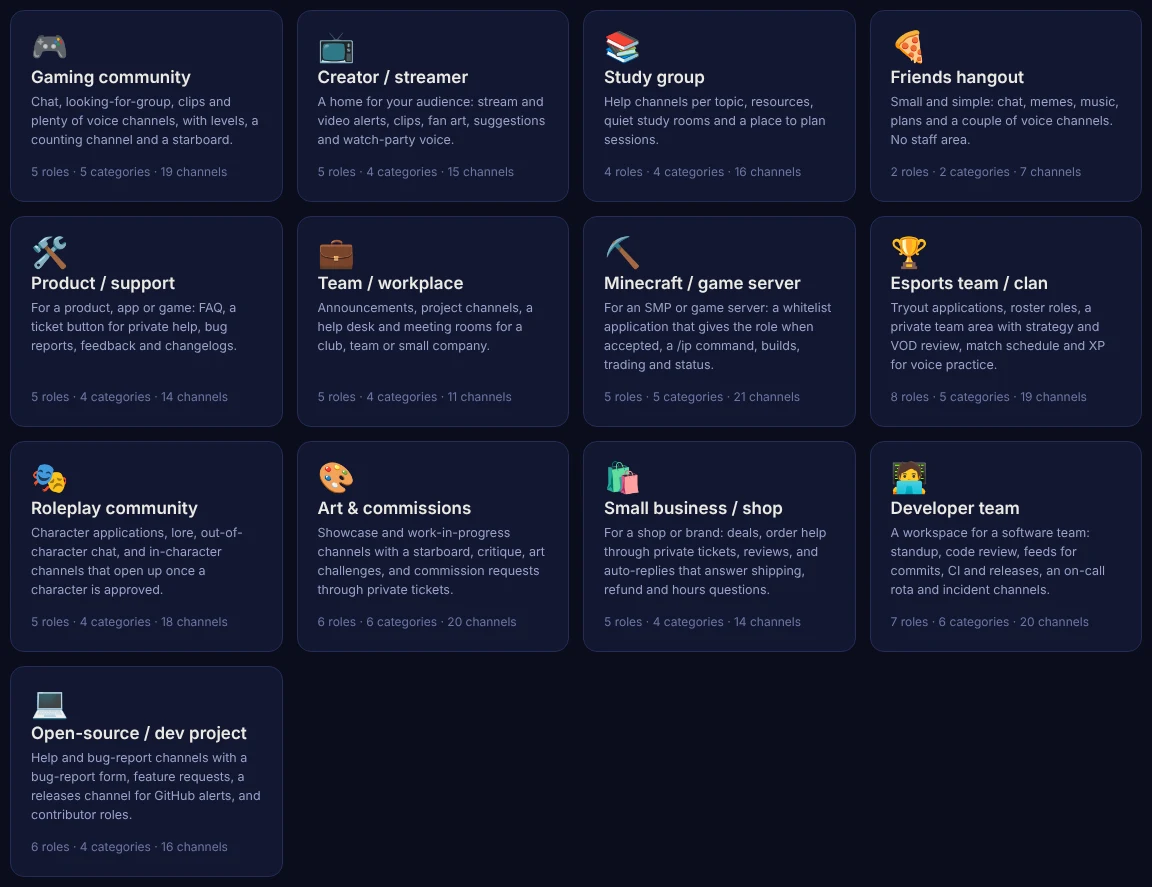
  • Thirteen layouts: gaming, creator, study group, friends, product support, team, Minecraft or game server, esports team, roleplay, art & commissions, small business, developer team and open-source project.
  • Comes ready to use: whitelist, tryout and character application forms, a /ip command, FAQ auto-replies and role menus where they fit.
  • Safe on existing servers: it only adds what's missing and makes a backup first.
  • Ready to go: read-only rules, a staff-only area, ticket buttons and application forms already in place, with the right FireFly features switched on.
The server template gallery with 13 templates, including Developer team
No extra bot needed

Staff applications, built in

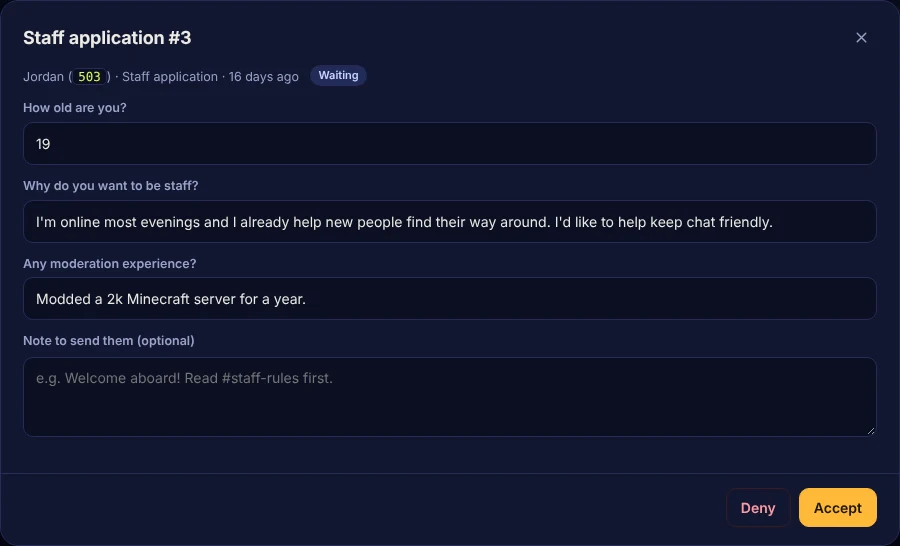
Staff applications, partner requests, reports, whitelists: make a form and post its button. Members fill it in with a pop-up right inside Discord.

  • Up to 5 questions, short or long answers, required or optional. A ready-made staff application is one click away.
  • Accept or deny with buttons in your staff channel, or on the dashboard with a note.
  • Accepting can give a role, and the member gets a DM either way.
  • No spam: one application at a time, and a cooldown before they can send it again.
A staff application with the member's answers and Accept and Deny buttons
Announcements

Post it, then fix it

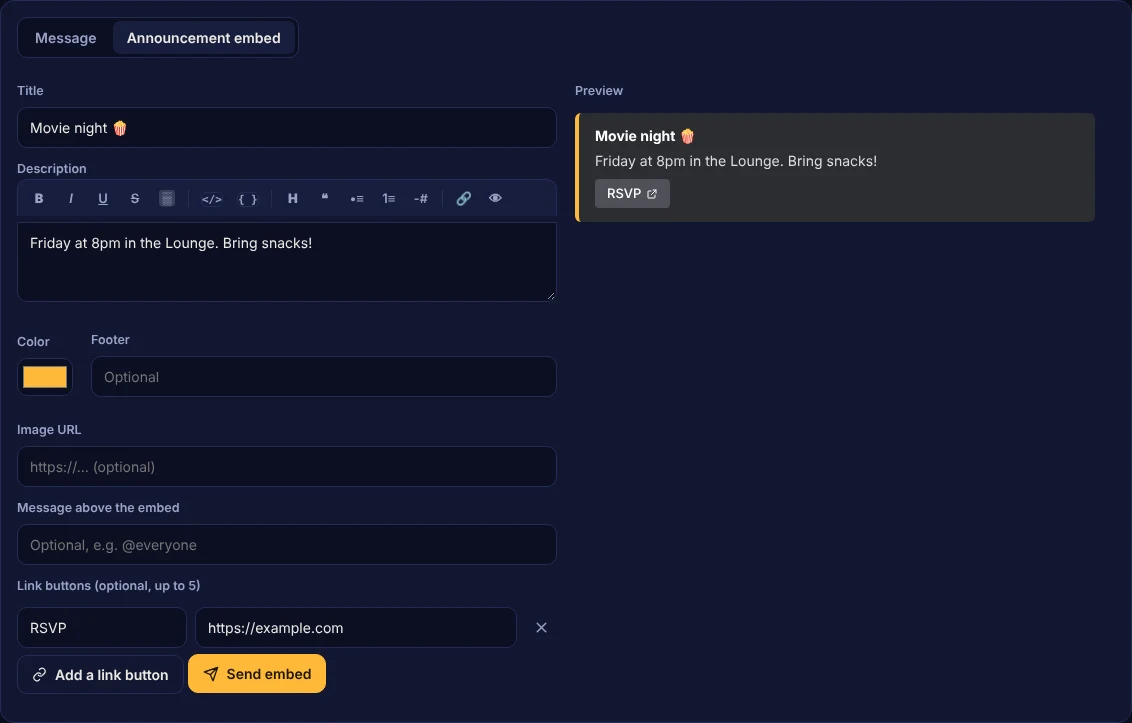
Write announcement embeds on the dashboard with a live preview, and add buttons that link to your rules, store or sign-up form.

  • Edit after posting: spotted a typo? Change the text, embed, colour, picture or buttons on any message FireFly posted.
  • Up to 5 link buttons under any announcement.
  • Schedule it for later, or every day or week.
The announcement builder with a preview and an RSVP link button
New

A dashboard that's yours

Press Customize on the Overview and build the home page you actually want to open every day.

  • 18 modules: this week's numbers, the inbox, recent moderation, top members, upcoming events, today's quests, busiest channels, quiet newcomers, who's on call, quick actions, a shared staff note and more.
  • Drag to arrange, make any module half or full width, or remove it.
  • Save for me keeps your layout on your account, on any device. Save for everyone sets the server's layout for the whole staff team.
  • Light or dark, roomy or compact: switch the whole dashboard to light mode or a tighter compact view with one button.
Customizing the Overview: modules with move, resize and remove controls, and Save for me and Save for everyone buttons
For developer teams

Ship from your Discord

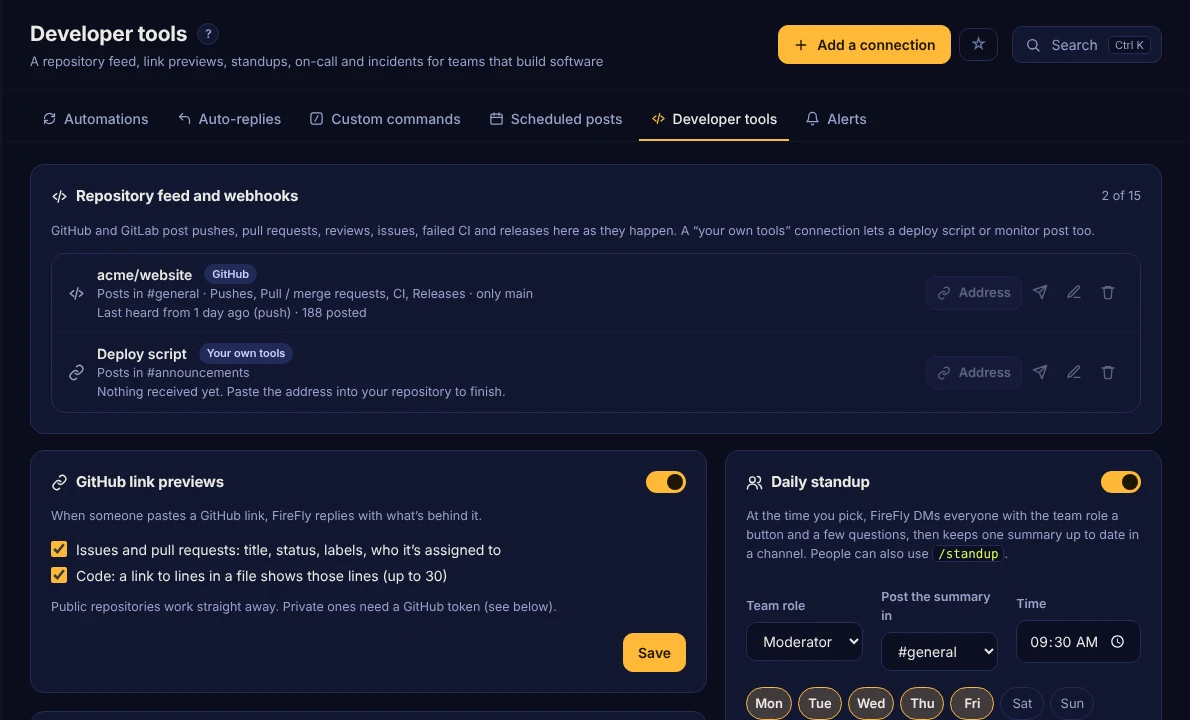
If your team builds software and talks on Discord, FireFly brings the rest of your tools in.

  • GitHub and GitLab feed: pushes, pull requests, reviews, issues and releases. Failed CI is posted, and so is the moment it passes again.
  • Your own tools: a webhook address your deploy script, monitoring or cron job can post to.
  • Link previews for issues, pull requests and lines of code, and issues from Discord: right-click a message → Apps → Create issue.
  • Daily standup by DM with one summary in your channel, an on-call rota with /oncall, and incident channels with /incident.
  • Starting fresh? The Developer team template builds the whole workspace.
The Developer tools page with a GitHub connection, link previews and the daily standup
Built for teams

Your whole staff, one dashboard

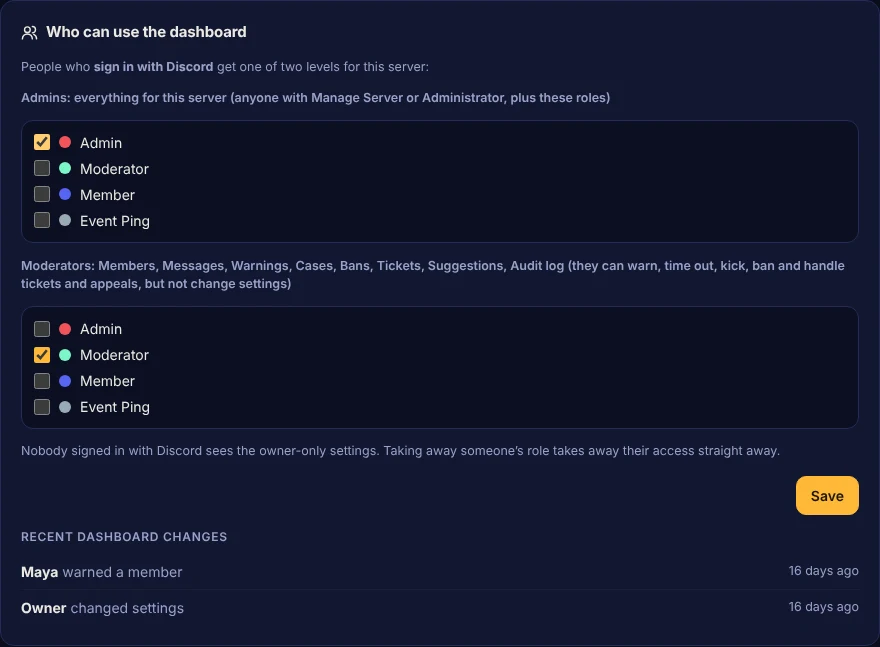
No passwords to share. Staff press Sign in with Discord and see only the servers they help run.

  • Admins and moderators: give moderators the moderation pages only. They can warn, time out, ban and handle tickets and appeals, but can't change settings.
  • Every change is credited to whoever made it, in Discord's audit log and on the dashboard.
  • Updates live as things happen in Discord. Press Ctrl+K to jump to any page, channel, role or member.
  • Easy to find your way: a sidebar grouped by job, tabs on every page, and an Explore page that lists every feature and what's switched on. Ctrl+K finds settings too: type "goodbye" and jump straight to it.
  • See who changed what: "Changed by Maya · 2 days ago" under each settings card, with every change one click from Undo.
  • Alerts in your Discord DMs: each staff member picks which alerts they get, from ModMail to rogue-staff warnings.
  • New-member preview: see exactly what someone experiences when they join, and catch setup mistakes first.
  • Works on your phone, with a server picker for everywhere FireFly is. Install it as an app and get notifications for new ModMail, reports and alerts.
Settings for who can use the dashboard, with admin and moderator roles
Looks the part

Welcome cards and rank cards, included

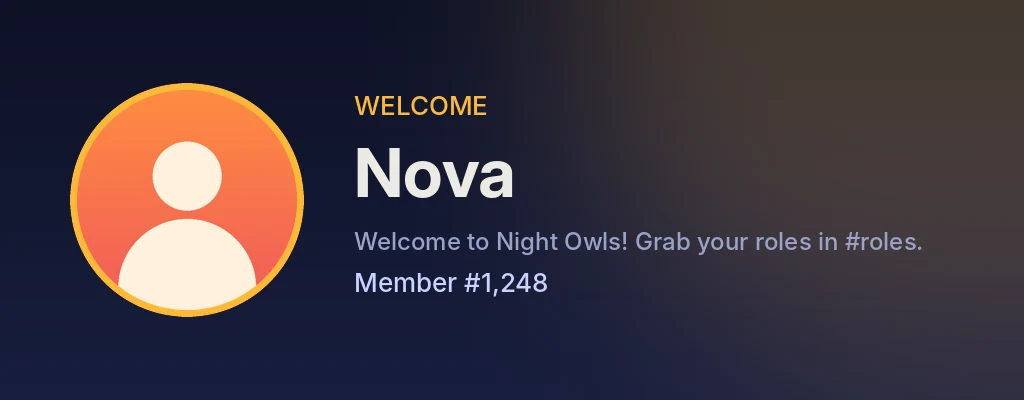
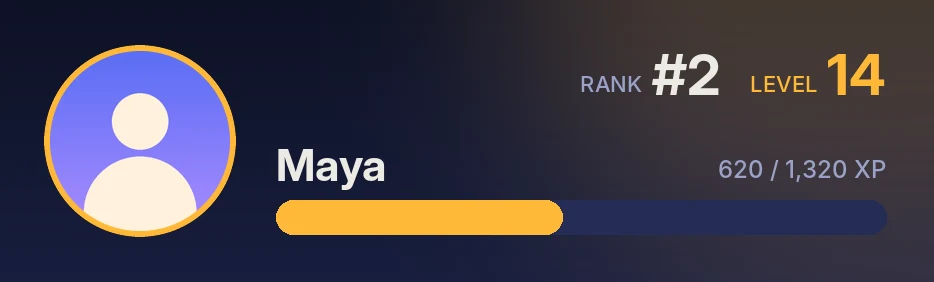
Greet every new member with a picture card showing their avatar and member number, in your colours. /rank gets the same treatment. Both are free; with Premium you can use your own background picture too.

A welcome card that says Welcome Nova, member number 1,248A rank card showing level 14, rank 2 and progress to the next level
Commands

Slash commands your members will use

Moderation commands only show up for people with the matching permission.

/rank · /leaderboardLevels and the most active members
/daily · /work · /balanceEarn and check coins
/shop · /buy · /paySpend and send coins
/slots · /blackjack · /roulette · /highlowCasino games against the house
/duel · /rps · /potBet coins against other members
/shittyParty card game: 4 rounds, then ride the bus
/coinflip · /richestDouble or nothing, and see the richest
/quests · /profileDaily quests, badges and your stats
/word · /triviaThe daily word game and trivia
/suggestPost an idea for people to vote on
/birthdayAdd your birthday, see upcoming ones
/remind · /reminders"Remind me in 2 hours…"
/afkLet people know you're away
/voiceControl your own voice channel
/ticketAdd people to a ticket, or close it
/warn · /warnings · /timeoutModeration
/ban · /purge · /lock · /slowmodeMore moderation
/temproleA role that removes itself later
/userinfoDetails about a member
/case · /casesLook up a case or someone's record
/issue · /standupOpen a GitHub issue, fill in the standup
/oncall · /incidentWho's on call, and run an incident
Right-click → AppsRank card, Profile, Warn, Summarize from here, Add to starboard
/helpOnly what's switched on, by category
/premiumYour server's plan and limits
Your own commands/rules, /ip, /socials, /8ball…
Plans

Free for every server. Premium when you grow.

Every feature works on the free plan. Premium raises the limits and adds a few extras.

Free

$0
  • Every feature: moderation, anti-raid, welcome cards, levels, tickets, forms, economy, insights and more
  • 5 custom commands · 15 auto-replies · 3 automations
  • 5 scheduled posts · 5 role menus
  • 2 forms · 3 YouTube, Twitch or RSS alerts
  • 2 stats counters · 10 shop items
Add to Discord

✨ Premium

Per server, monthly
  • 50 custom commands · 100 auto-replies · 50 automations
  • 50 scheduled posts · 30 role menus
  • 25 forms · 50 alerts
  • 10 stats counters · 25 shop items
  • AI helpers with your own Claude or OpenAI key: /summarize, ticket reply drafts, /ask from your server info, and flagging for mods
  • Branding: your colour, footer and emojis on FireFly's messages, card themes and fonts, your own names for levels, XP and coins, and a dashboard themed to your server (colours, fonts, background, your logo)
  • Your own background on welcome and rank cards
  • XP for time in voice
  • Daily automatic backups
Subscribe in Discord

Subscribe from FireFly's store page in Discord, or type /premium in your server and press the button. Discord handles the payment, and Premium covers everyone in that server. Cancel any time in Discord: User Settings → Subscriptions.

FAQ

Questions

How do I add FireFly to my server?

Click Add to Discord, pick your server and press Authorize. You need the Manage Server permission in that server.

Is FireFly free?

Yes. Almost everything works on the free plan, with fair limits on things like custom commands and forms. Premium is a monthly subscription per server, paid through Discord: it raises those limits and adds AI helpers, branding (your colour, footer, emojis and card themes), your own card backgrounds, XP for time in voice and daily backups.

How do the AI helpers work, and what do they cost?

They're part of Premium. A server admin pastes their own Claude (Anthropic) or OpenAI API key on the dashboard, so the server pays its AI provider directly for what it uses, with a daily limit you choose. Members can @mention FireFly to chat, and get /summarize, /ask (which can also search the web, with sources) and optionally /search, staff get /draft in tickets, and mods can switch on flagging. Only what each helper needs is sent to the AI, and FireFly keeps none of it. The Privacy Policy has the details.

Can the developer read our server's messages or mod chats?

No. On FireFly's dashboard, the developer only sees each server's name, size, health and plan, not its messages, members, cases, tickets, ModMail or settings. If you'd like help, an admin types /support-access to let the developer in for a set time, and you can see everything they open. Emergency access exists for serious abuse only; it lasts an hour, and your server's owner is told why. Details are in the Privacy Policy.

Why does it ask for Administrator?

FireFly does a lot (roles, channels, moderation, tickets, voice), so Administrator makes sure every feature works straight away. You can lower its permissions later in your server settings; features that need a removed permission will simply stop working.

How do I change FireFly's settings for my server?

Open the dashboard and press Sign in with Discord. You'll see every server where you have Manage Server. Admins can also pick moderator roles that get a moderation-only view, so nobody has to share a password.

We're switching from MEE6. Do members lose their levels?

No. On the Levels page, choose Import levels → From MEE6. FireFly uses the same XP curve, so everyone keeps exactly the same level. Other bots work too, through a spreadsheet export.

Can FireFly set up my whole server?

Yes. On the dashboard's Templates page, pick one of 13 layouts (gaming, Minecraft, esports, roleplay, art, small business, developer team, open-source and more). FireFly creates the roles, channels and permissions, and switches on matching features. On an existing server it only adds what's missing, and makes a backup first.

I was banned from a server. Can I appeal?

If that server takes appeals through FireFly, go to the appeal page, sign in with Discord, and tell the staff why you should be let back in.

What does FireFly store about my server?

Only what its features need, like levels, warnings, coins and settings. It never sells or shares data. See the Privacy Policy for the full list and how to have your data deleted.

FireFly isn't responding to commands.

Make sure it was added with the applications.commands scope (the Add to Discord button does this), and that it can see and send messages in that channel. Press Ctrl+R in Discord if new commands don't show up.

Give your server superpowers

Add FireFly in under a minute.

The invite button isn't set up yet: put your Application ID in config.js.